High-Altitude Trampoline Video
Explore another imaginative AI video concept with a distinct setting and action.

Loading history…
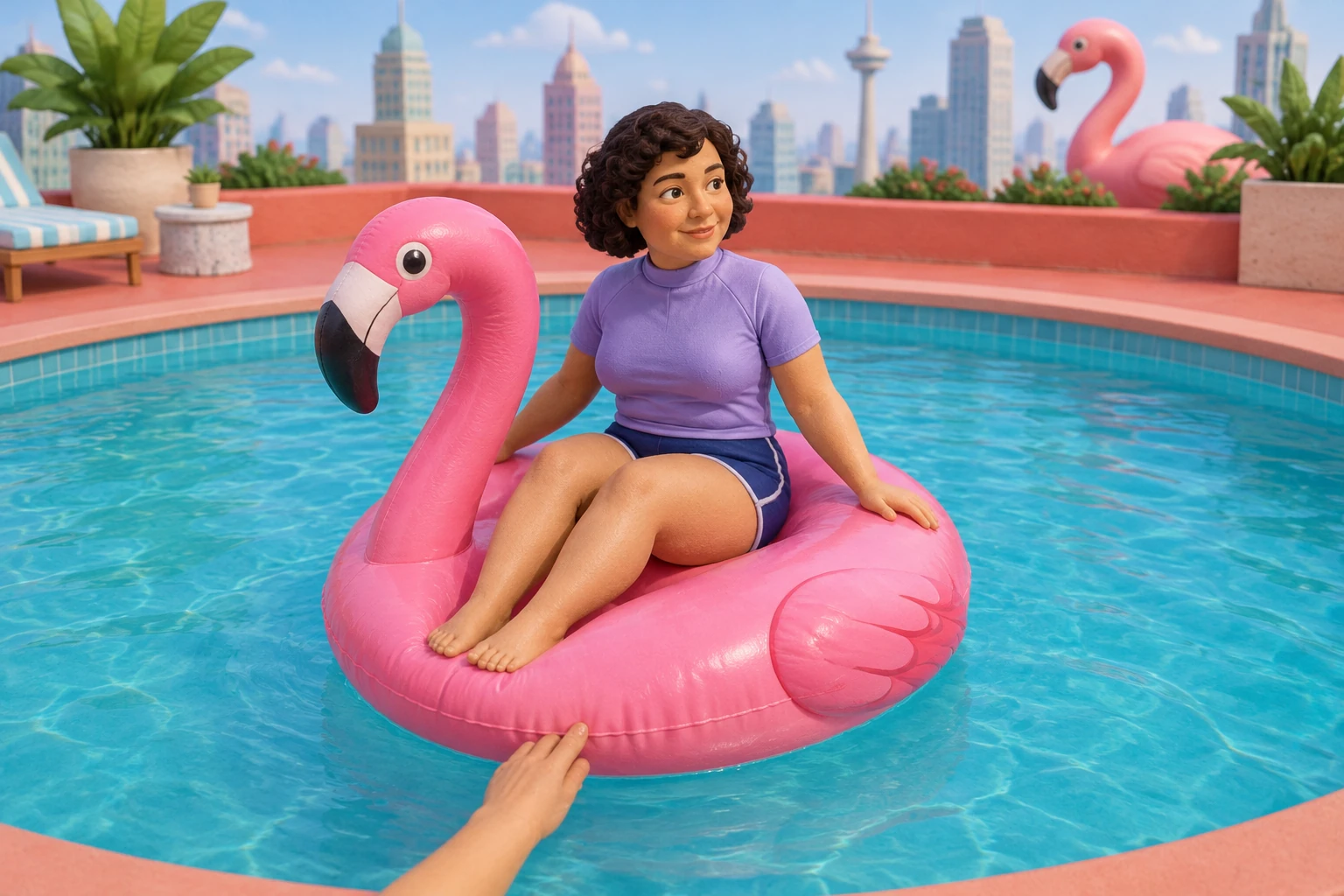
Flamingo Floatie AI turns one adult portrait into an eight-second miniature poolside scene. Start with the prepared direction: a helping hand nudges a pink float back into the pool, followed by a calm drift and thankful wave. Add optional visual notes, check the live credit quote, and review the finished clip in History.
Choose one clear adult portrait with the face, hair and shoulders visible. Your photo supplies the adult’s appearance and outfit; the miniature rooftop pool comes from the prepared scene direction.
The full eight-second routine is already prepared: a calm approach near the pool edge, one helping hand at the rim, an inward nudge and a small thankful wave. Optional visual notes start empty and can stay empty. Add a brief preference for lighting, color or mood if wanted.
Seedance 2.0 uses paid access and an eight-second duration here. Review the available aspect ratio, resolution and audio options, then check the current credit requirement before generating. Account eligibility and available credits are shown in the interface.
Wait time varies, so allow the job to finish before judging it. Find completed work in History, review the full clip, and download it if it meets your needs. Check faces, the hand-to-float contact, the direction of drift, and the whole eight-second sequence—not just a preview frame.
Give the short scene a clear beginning, middle and end: a calm approach, gentle contact at the rim, an inward drift and a small wave. The prepared direction keeps these actions together. Keep any optional notes focused on one visual preference so the miniature setting leaves room to follow the rider and float.

A clear portrait helps you compare the adult’s face, hair and clothing with the finished clip. Choose a permitted photo with an unobstructed face and a clean outline around the shoulders. The example uses a lavender top, but your own photo defines the intended appearance. This is a fictional miniature pool scene.

A written scene request cannot guarantee that contact, direction, or timing will match every detail. Review whether the hand actually meets the float rim, whether the float moves back into the pool, and whether the rider remains coherent throughout. This guide does not provide original meme audio or an exact spoken line. Check the live audio options and add permitted sound separately if wanted.

Watch the full eight seconds. Compare the adult’s face and clothing with your portrait, then inspect the helper hand and its contact with the float rim. Follow the float away from the near edge and into open water. Look for sudden shape changes or extra hands. If a detail needs another attempt, check the current quote and use a short visual note to clarify it.
It turns one adult portrait into a request for an eight-second miniature poolside scene. The prepared direction follows a helping hand, a pink float, an inward drift and a small thankful wave.
No. The complete scene direction is prepared. Optional visual notes start empty and can stay empty; use them for a brief preference for light, color or mood.
This workflow has one photo picker and no second-person or second-photo input. It also does not accept a video upload or provide a built-in recorded motion reference.
Seedance 2.0 requires paid access. Check the current credit quote and any trial eligibility in the live interface before generating; do not rely on an assumed fixed price or trial.
Wait time varies. Completed work can be found in History, where you can review the clip and download it if you are satisfied.
No. It asks for those beats, but exact motion is not guaranteed. Review the face, contact, drift direction, and complete clip; the guide does not include original meme audio or a spoken line.
Explore another imaginative AI video concept with a distinct setting and action.
See a different kind of AI video scene built around an interior location.
Browse an image-making workflow for a stylized figure concept.
Check current access and pricing information before choosing a workflow.
southparkcharacter.com · Updated